

Edit GitHub docs without learning Git or Markdown
Write, collaborate, and save docs that live in your GitHub repo. specgit handles the Git and the Markdown for you. Obsidian vaults work too.
Opens a sample doc. No account required.

How it works
Open a doc
Start new, pick an existing doc, or easily convert Word, PDF, or HTML files.
Edit visually
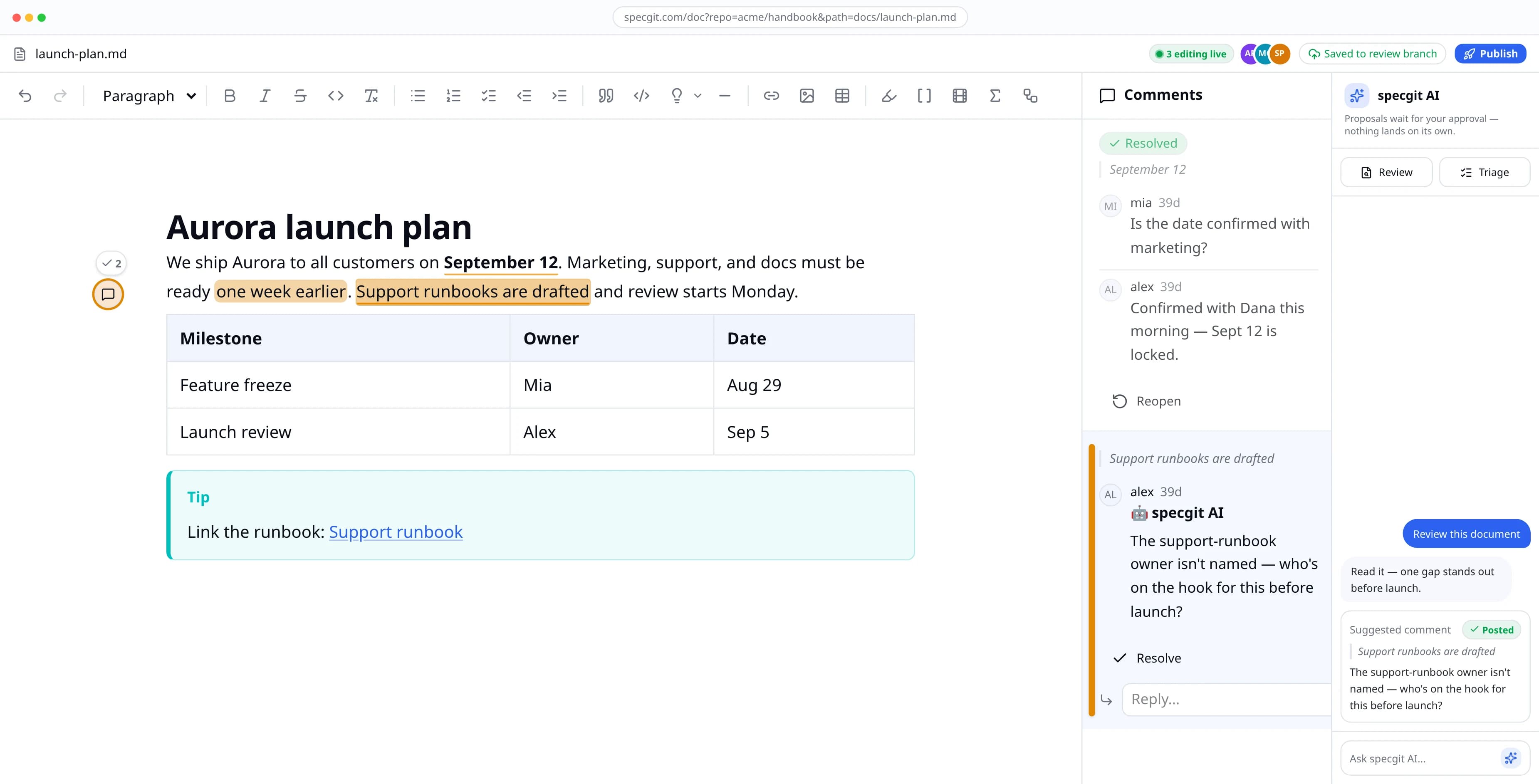
Format, comment, and edit together.
One-click Publish
Click Publish to update the version everyone sees. If your team needs approvals, specgit waits for them.
Features
Format like a real doc
Headings, tables, images, callouts, highlights, footnotes, and flow charts.
Example Heading
Six levels, from H1 down to H6.
Comments and live co-editing
Leave inline comments and edit the same file with teammates. Cursors show up while you work; comments remain tracked with the document's history.
Review + Triage
Review reads the whole doc and leaves comments. Triage fixes them and closes the threads. Nothing changes until you approve it.
Zero Content Retention
GitHub remains the source of truth. We never keep a copy of documents or comments.
Obsidian Canvas boards
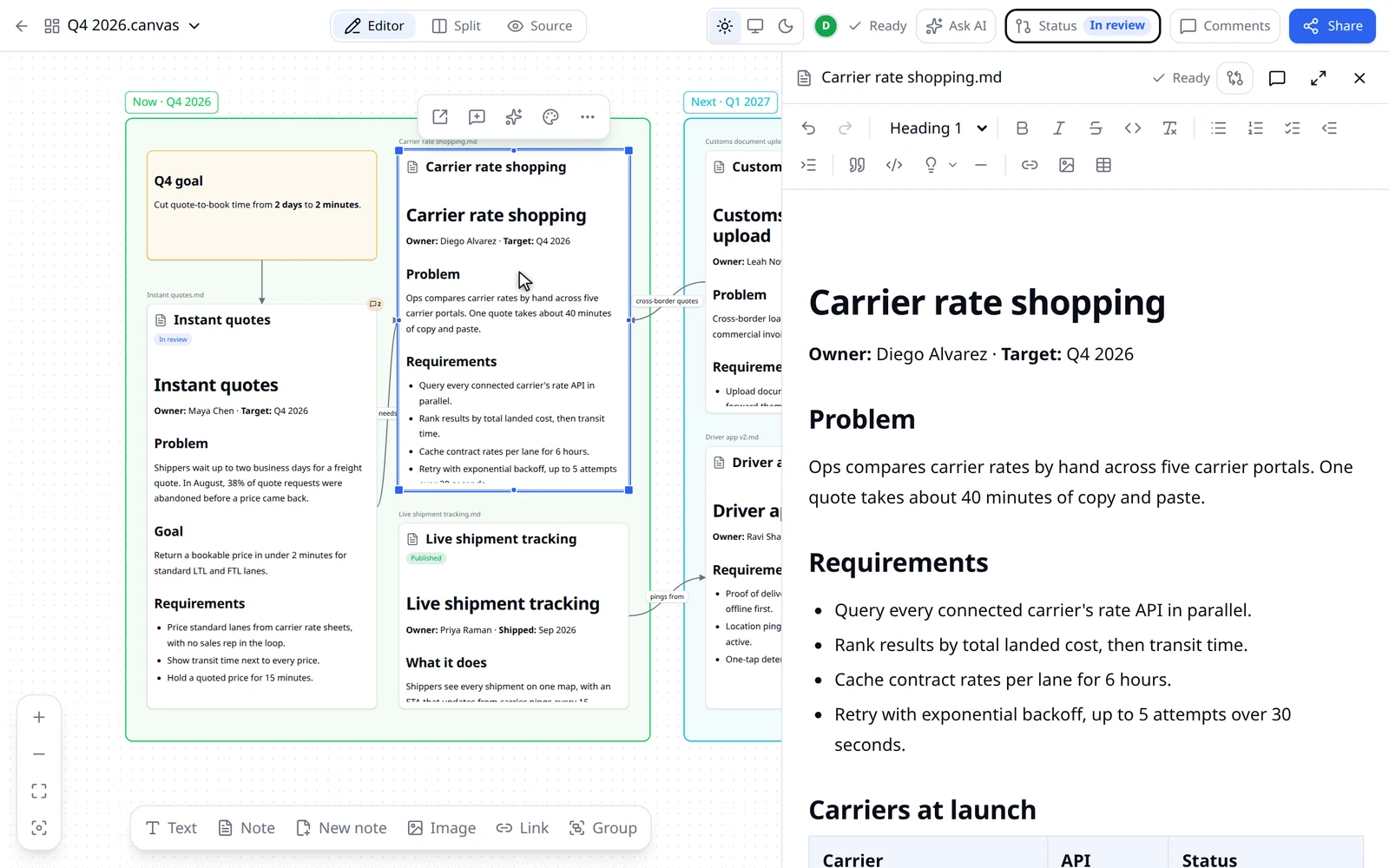
Open a board in your browser, edit every note beside it, and review them as one set. Saves keep Obsidian's exact format. On every plan.
- Ask Agent on boards. It reads every card and the notes behind them, and proposes board changes and note edits for you to approve. Pro and Pro Plus.
- Repo context. Ask Agent can read other files in your repo for background, from GitHub, for that request only. Pro and Pro Plus.
- Comments across revisions. Open conversations carry into each new revision, and the version a comment was made on is one click away. Every plan.
- Status. One button shows where a review stands, and its panel adds reviewers, submits, and publishes, for a document or a whole board. Every plan.
Common questions
Do my engineers have to change anything?
No. Your docs stay in your GitHub repo as ordinary Markdown or HTML files. When you save, specgit saves the change to GitHub as a commit, under your own GitHub name. When a doc is ready, specgit opens a pull request, which is GitHub's way of asking teammates to review a set of changes. Engineers review it in GitHub the way they review code, and your repo's review rules still apply. For a GitHub organization, an admin adds the specgit GitHub App once, for the repositories they choose.
Do you keep my docs?
No. Zero Content Retention: we never keep a copy of your documents or comments. GitHub remains the source of truth. The only things that ever touch our servers are temporary: live-collaboration state while you edit together, agent processing you explicitly invoke, and feedback you explicitly choose to share. The Privacy Policy explains each case.
Do I need to know Git or Markdown?
No. You write and format in a visual editor, the way you would in any doc tool, and specgit handles the Git for you. Everyone who edits signs in with their own GitHub account.
Can I try specgit before I connect GitHub?
Yes. Open a sample doc at specgit.com/try. It's the real editor, and you don't need an account.
Is there a free plan?
Yes. The Free plan includes 1 repository and 5 publishes a month, with no credit card. Pro is $8 per seat a month, and Pro Plus is $16 per seat a month with $10 of agent usage included each month.